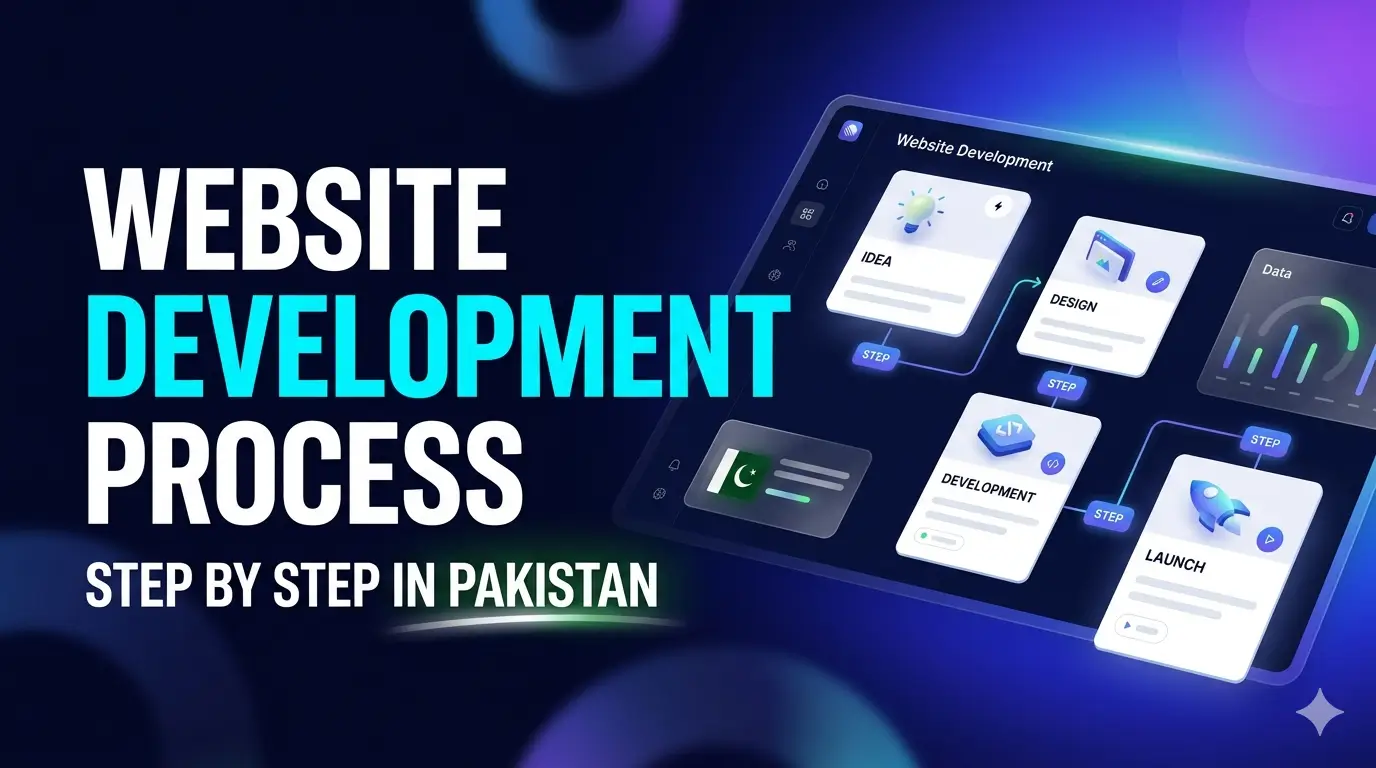
The website development process in Pakistan involves 10 key steps: (1) Define goals and requirements, (2) Choose domain and hosting, (3) Plan the sitemap and structure, (4) Create wireframes, (5) Design the visual interface, (6) Develop frontend and backend, (7) Write and add content, (8) Test and fix bugs, (9) Launch the website, (10) Maintain and grow it. Most business websites take 3–8 weeks from start to launch.
Here’s what usually happens in Pakistan: a business owner decides they need a website, asks around, gets three WhatsApp quotes ranging from PKR 15,000 to PKR 180,000, picks one somewhat randomly, and then spends the next three months confused about why things are taking so long and what is actually happening.
The process isn’t complicated. But nobody explains it. This guide is going to change that. Whether you’re a restaurant owner in Lahore, a clothing brand in Karachi, a school in Faisalabad, or a real estate agency in Islamabad — this step-by-step breakdown applies to you.
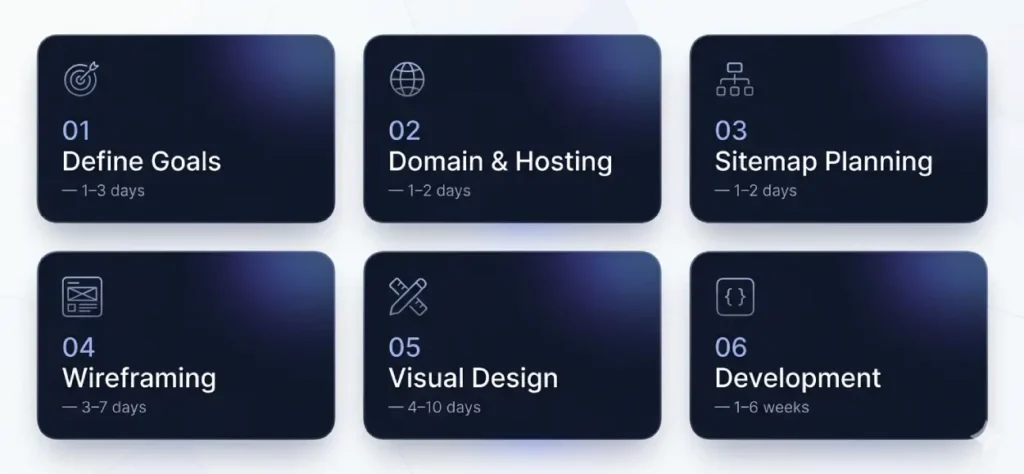
1 Define Your Goals & Requirements
Before anyone opens a design tool or writes a line of code, you need to get crystal clear on one thing: what do you actually need this website to do?
This sounds obvious, but you’d be surprised how many Pakistani businesses skip this step entirely and jump straight to “bhai, design shuru kar do.” The result is a website that looks nice but doesn’t solve any business problem.
What to Figure Out in This Step
Your Business Objectives
Are you trying to generate leads (calls, WhatsApp messages, form submissions)? Sell products online? Build credibility and trust? Rank on Google? Every goal leads to different website decisions. A website built to generate calls needs a different layout than one built to sell products.
Your Target Audience
Who is actually going to visit your website? Are they Lahore-based professionals browsing on a laptop, or are they young shoppers in smaller cities scrolling on a Tecno phone with a 4G connection? Knowing your audience shapes every design decision — from font size to page load speed to language choice (Urdu, English, or bilingual).
Features You Need
- Contact form / WhatsApp button
- Product catalogue or ecommerce store
- Photo or portfolio gallery
- Booking or appointment system
- Blog or news section
- Map / location finder
- Student portal or staff login
- Live chat integration
- Payment gateway (JazzCash, Easypaisa, bank cards)
- Multi-language support (Urdu + English)
Budget Planning
Be honest with yourself about budget. A PKR 30,000 website will deliver a very different result from a PKR 200,000 website. Knowing your budget upfront lets you make realistic decisions about which features to include now and which to add later. It also protects you from promises that sound too good to be true.
Competitor Research
Look at your competitors’ websites — not to copy them, but to understand the baseline your audience expects. If every top real estate agency in Islamabad has a property search filter, your visitors will expect the same from you. Note what you like, what’s missing, and what you’d do better.
An academy in Lahore sits down to define their goals. They want parents to find them on Google, read about courses, and fill out an admission inquiry form. They don’t need an online payment system yet. Result: a clean 7-page website with a prominent inquiry form — not an overcomplicated portal. Budget: PKR 65,000. Timeline: 3 weeks.
💡 Pro Tip: The Discovery Document
Ask any agency you’re considering whether they start with a “discovery document” or “project brief.” This is a written summary of your goals, audience, features, and timeline. Agencies that use this have a process. Ones who skip straight to design are a red flag. You want someone who understands your business before touching their keyboard.
Choose Your Domain & Hosting in Pakistan
Your domain is your address on the internet. Your hosting is where your website actually lives. Both decisions have long-term consequences, and both are often rushed in Pakistan’s market.
Choosing the Right Domain Name
Your domain name should ideally be your brand name — simple, memorable, and easy to type on a mobile keyboard. Avoid hyphens, numbers, and anything too long. If “yourbrandname.com” is taken, don’t go for “your-brand-name-pk-official.com” — that’s terrible for branding and SEO. Look for creative alternatives first.
.pk vs .com — Which One?
| Extension | Cost (Annual) | Best For | SEO Impact |
|---|---|---|---|
| .com | PKR 3,500–6,000 | Most businesses, international reach | Strong globally |
| .com.pk | PKR 1,500–2,500 | Local Pakistan businesses | Good for Pakistan searches |
| .pk | PKR 1,200–2,000 | Brands, government-adjacent | Pakistan-focused |
| .net / .org | PKR 3,500–5,000 | NGOs, networks, non-profits | Generic |
| .store / .online | PKR 2,000–8,000 | Ecommerce only | Newer, mixed results |
For most Pakistani businesses, a .com domain is the safest long-term choice — especially if you ever plan to expand beyond Pakistan or market to expat Pakistanis abroad. A .com.pk is perfectly fine for local service businesses like clinics, academies, or restaurants.
Hosting Options in Pakistan
Local Hosting Providers
Local Pakistani hosts like PkNIC, Navicosoft, HOSTAAJ, and Brainforce offer hosting with local customer support (which is genuinely useful when something goes wrong at 11pm). Pricing is often in PKR, making it easier to manage. Speeds on local hosting are generally good for Pakistani visitors, though international performance may be slower.
International Hosting
Providers like SiteGround, Cloudways, and DigitalOcean are popular among experienced Pakistani developers. They offer better uptime guarantees, faster global speeds, and more advanced features. Pricing is in USD, which means exchange rate fluctuations affect your annual costs.
⚠️ Don’t Accept “Free” Hosting from Your Developer
- If your developer says “hosting is included free,” ask which company and who owns the account
- Your hosting account should be in YOUR name, not theirs
- If you ever need to change developers, you want full control of your hosting
- Many Pakistani clients get held hostage because a developer “owns” their hosting
A clothing brand in Karachi launches their online store. They register brandname.com for PKR 4,200/year through Namecheap, then use Cloudways hosting at around PKR 4,500/month for a fast, scalable setup. The domain is in their own name, the hosting is in their own name. When they later change their developer, there’s zero disruption.
Plan the Website Structure & Sitemap
Before a single design element is created, your website needs a blueprint. This is called a sitemap — a list of all the pages your website will have and how they connect to each other.
Think of it like drawing the floor plan of a house before starting construction. You wouldn’t build rooms randomly and connect them later. A website works the same way.
Common Pages for Pakistani Business Websites
| Page | Purpose | Essential? |
|---|---|---|
| Homepage | First impression, value proposition, calls to action | Always |
| About Us | Build trust, show team, history, values | Always |
| Services / Products | What you offer and why it matters | Always |
| Contact | Form, WhatsApp, phone, map, address | Always |
| Portfolio / Gallery | Show your work visually | Often |
| Blog / News | SEO content, industry insights | Recommended |
| Testimonials | Social proof from real clients | Often |
| FAQ | Reduce common questions, help SEO | Recommended |
| Privacy Policy | Legal requirement if collecting data | Often |
| Location Pages | Local SEO for businesses in multiple cities | If multi-city |
Planning the User Journey
Think about the path a visitor takes from landing on your site to taking action. For a restaurant, the journey might be: Homepage → Menu → Location & Hours → Call / WhatsApp button. For a real estate agency: Homepage → Property Listings → Individual Property Page → Contact Form.
Every page should have a clear “next step” for the visitor. Navigation should be simple enough that someone unfamiliar with your brand can find what they need in under two clicks.
A real estate agency in Bahria Town, Islamabad plans their sitemap: Home, About, Properties (with sub-categories: Residential, Commercial, Plots), Location, Testimonials, Blog, Contact. The developer also plans a hidden “admin panel” page where staff upload new property listings. Total: 8 public pages + 1 admin page = clear, manageable structure.
Wireframing & UI/UX Design
A wireframe is a skeleton of your website — black-and-white boxes and lines showing where elements will go, without any actual colour, images, or text. It’s the bridge between “here’s what the site needs to do” and “here’s what it will look like.”
Many budget developers in Pakistan skip this step entirely. That’s a problem — it’s like skipping architectural drawings and just starting construction. You’ll end up with structural issues that are expensive to fix later.
Why Wireframing Matters in Pakistan’s Market
Pakistani businesses often have many stakeholders — owners, partners, family members — all with opinions about how the website should look. A wireframe gives everyone something concrete to review and agree on before expensive design and development work starts. Changes at the wireframe stage take minutes; the same change during development takes days.
Mobile-First Design: Non-Negotiable in Pakistan
Over 70% of Pakistani internet users browse on mobile devices — and many of those are on budget Android phones with smaller screens. Your wireframe, and every design decision that follows, must start with the mobile version first.
This isn’t just a preference — it directly affects your Google rankings. Google uses mobile-first indexing, meaning it evaluates your mobile site as the primary version. A website that works beautifully on a desktop but breaks on a Tecno Camon will rank poorly and frustrate most of your visitors.
UI/UX Principles That Matter for Pakistani Users
- Large, thumb-friendly tap targets (buttons at least 44px)
- WhatsApp contact button prominently placed — Pakistanis prefer WhatsApp over email
- Fast-loading images (Pakistani 4G can be inconsistent)
- Clear Urdu/English language options where relevant
- Simple navigation — avoid hidden menus that confuse less tech-savvy users
- Trust signals visible early: phone number, location, reviews
Brand Identity in Design
Your website’s visual design should reflect your brand consistently — the same logo, colours, and tone you use on your signboard, business card, or social media. If you don’t have defined brand colours or a logo, this is the time to sort that out. A developer can’t build a consistent brand experience from nothing.
Website Visual Design
Now comes the part everyone gets excited about — the actual design. This is where your wireframe gets turned into a visual mockup complete with colours, fonts, images, and layout details.
A good designer will present you with 1–2 homepage concepts to choose from. You select the direction you prefer, provide feedback, and they refine it. Once the homepage is approved, the inner pages follow.
What Happens During This Stage
Colour Selection
Colours carry meaning. Green evokes trust and growth (think banking and healthcare). Red creates urgency (ideal for sales, food). Navy blue signals professionalism and authority. Your primary brand colour becomes the dominant website colour, supported by 1–2 accent colours. A professional designer won’t just pick colours that “look nice” — they’ll choose based on your industry, audience, and goals.
Typography
Font choices communicate personality before a visitor reads a single word. A medical clinic and a streetwear brand use completely different fonts for a reason. Most Pakistani website designs use Google Fonts (free and fast-loading), but the specific pairing matters enormously. A heading font + body font combination should be chosen deliberately.
Design Revisions
Most professional agencies in Pakistan include 2–3 rounds of design revisions in their project scope. “Unlimited revisions” is often a red flag — it usually means the designer lacks confidence in their process, or it hides an hourly billing structure. Know how many revision rounds are included before you sign anything.
🚨 Warning: “Just Copy That Website” is Not a Brief
Many Pakistani clients hand over a competitor’s website and say “make something like this.” While references are helpful, copying another site creates legal risk (copyright), SEO problems (duplicate structure), and a brand identity that doesn’t reflect your business. Use references for inspiration, not as a template.
A private hospital in Lahore’s Johar Town goes through the design phase. The agency presents two concepts: one in deep green and white (clinical, trustworthy), one in blue and light grey (modern, tech-forward). The hospital picks the green concept, requests that the Urdu logo variant be more prominent, and approves within a week. The remaining 8 pages are designed in 4 days, following the approved homepage direction.
Website Development: Frontend & Backend
Design approved. Now it’s time to actually build the thing. This is the technical phase — and it’s where most of the project time is spent.
Development happens in two layers: frontend (what your visitors see and interact with) and backend (the logic, database, and server-side work that powers it). Some websites only need frontend work; others need both.
Frontend Development
Frontend development converts your approved design mockups into working web pages. The developer writes HTML (structure), CSS (styling), and JavaScript (interactivity) to bring the visual design to life. This includes making sure the site is responsive on all screen sizes, animations work correctly, forms submit properly, and navigation flows smoothly.
Backend Development
Not every website needs a backend. A simple brochure site for a Lahore restaurant needs no backend at all. But an ecommerce store (managing products, orders, inventory), a school portal (student logins, results), or a real estate site (dynamic property listings) all require backend development. This typically involves a server-side language (PHP, Node.js, Python) and a database (MySQL, PostgreSQL).
CMS vs Custom Development in Pakistan
- Faster to build (2–6 weeks)
- Lower initial cost
- Client can update content themselves
- Massive plugin ecosystem
- WooCommerce for ecommerce
- Can slow down with poor plugins
- Needs regular updates and security
- Built exactly to your requirements
- Faster, more secure, more scalable
- No unnecessary plugin bloat
- Higher upfront cost
- Longer build time (2–6+ months)
- More expensive to maintain
- Needs a skilled development team
WordPress vs Custom: The Pakistani Market Reality
The honest truth? For 90% of Pakistani small and medium businesses, WordPress is the right choice. It’s well-supported, has a huge ecosystem of developers in Pakistan who know it deeply, and can be maintained by the business owner without needing a developer for every small change.
Custom development makes sense when you have very specific functionality that no plugin can handle, when you’re building a SaaS product, or when performance and security are mission-critical (think fintech startups).
Content Creation
This is the step that most Pakistani businesses are completely unprepared for — and it’s the number one reason projects go over deadline.
A website without good content is like an empty shop with a beautiful shopfront. The design draws people in, but the content is what makes them stay, trust you, and take action.
What Content Your Website Needs
Homepage Content
Your homepage headline is arguably the most important sentence on your entire website. It needs to tell a first-time visitor what you do, who you do it for, and why they should care — in under 10 words. “Welcome to Our Website” does not do this. “Karachi’s Trusted Property Lawyers — Clear Advice, Fixed Fees” does.
Service Pages
Each service you offer deserves its own dedicated page — not just a bullet point. A dedicated service page allows Google to rank you specifically for that service. A dental clinic that has separate pages for “teeth whitening,” “dental implants,” and “braces” in Lahore will rank far better than one with a single “Services” page listing everything.
SEO Content
If ranking on Google matters to you (and it should), your content needs to be written with both humans and search engines in mind. This means using keywords your customers actually search — “best web development company in Lahore,” “ecommerce website cost Pakistan” — naturally within your content. Not stuffed in awkwardly, but woven in where they make sense.
Images and Media
Stock photos are the enemy of trust. Pakistani users can spot a stock photo instantly, and it immediately signals “this isn’t a real business.” Invest in at least a few real photos — of your team, your office, your products, your work. Even taken on a good smartphone, real photos outperform stock imagery every time.
💡 Content Writing Costs in Pakistan
- Professional web copywriting: PKR 1,500–8,000 per page
- SEO blog articles (1,000 words): PKR 3,000–12,000
- Product descriptions (ecommerce): PKR 500–2,500 per product
- Urdu web content: PKR 1,000–5,000 per page (slightly lower pool of skilled writers)
A catering business in Multan delays their website launch by 6 weeks because they can’t provide photos of their food. The developer has the site ready but can’t launch with placeholder images. Lesson: gather your content — photos, text, logo — before development begins, not after. It’s the single biggest cause of project delays in Pakistan’s web market.
Testing & Quality Assurance
Before your website goes live, it needs to be put through its paces. Testing is the unglamorous step that separates professional web development from amateur hour — and in Pakistan, it’s often rushed or skipped entirely on budget projects.
What Gets Tested
Speed Testing
Use Google PageSpeed Insights and GTmetrix to measure load time. A website should ideally load in under 3 seconds on mobile. In Pakistan’s variable 4G environment, aim for under 2 seconds. Unoptimized images, excessive plugins, and cheap hosting are the most common culprits for slow sites.
Mobile Responsiveness
Test on actual physical devices — not just browser developer tools. A site that looks fine in Chrome’s mobile emulator can still break on a real Infinix or Samsung A-series phone. Test at least 3–4 different screen sizes. Pay particular attention to forms, buttons, and navigation menus on small screens.
Browser Compatibility
Your website needs to work consistently in Chrome, Firefox, Safari, and Edge. Pakistani users predominantly use Chrome on Android, but enough use Safari (iPhone users) and Firefox to make cross-browser testing worthwhile. Each browser renders CSS slightly differently, and small bugs can be surprisingly jarring.
Form and Function Testing
- All contact forms submit correctly and send emails
- WhatsApp button opens the right number
- Phone numbers are clickable on mobile
- Payment gateway completes a test transaction (for ecommerce)
- Search filters return correct results
- Admin panel functions work for client-managed content
- All images load correctly and aren’t broken
- 404 pages are set up and styled correctly
SEO Technical Checks
- Page titles and meta descriptions are set for every page
- Images have descriptive alt text
- XML sitemap is generated and correct
- robots.txt file is configured properly
- SSL certificate is active (https, not http)
- No broken links or 301 redirect issues
- Schema markup is implemented where relevant
A textile exporter from Faisalabad launches their website and discovers two weeks later that their contact form wasn’t actually sending emails — the leads were going nowhere. A proper testing phase would have caught this. Always test every form by submitting it yourself and confirming the notification email arrives.
Website Launch
The site is built and tested. It’s time to go live. Launching a website is more than just clicking “publish” — a proper launch involves a checklist of technical steps that ensure everything goes smoothly.
Pre-Launch Checklist
- Final client review and sign-off on all content and design
- DNS records pointed from domain registrar to hosting server
- SSL certificate confirmed active (padlock in browser)
- WordPress or CMS admin credentials created and handed to client
- All placeholder content removed
- 301 redirects set up if replacing an old website
- Caching plugin configured for speed
- Backup system activated (daily automatic backups)
Analytics Setup
On launch day, connect your website to the essential tracking tools. Without these, you’re flying completely blind — you won’t know how many people visit, where they come from, what they do on your site, or where they leave.
- Google Analytics 4 — tracks visitor counts, behaviour, conversions
- Google Search Console — shows how your site appears in Google search, which keywords bring traffic, and any indexing errors
- Google Business Profile — critical for local businesses; connects your website to Google Maps and local search
- Meta Pixel — if you run or plan to run Facebook/Instagram ads, this is essential
DNS Propagation — Set Expectations
When you point your domain to your new hosting, the change doesn’t happen instantly. DNS propagation can take anywhere from a few minutes to 48 hours. During this time, some visitors will see the old site and some will see the new one, depending on their location and internet provider. This is normal — inform your client so they’re not alarmed.
After launching a website in Pakistan, the immediate next steps are: set up Google Analytics 4, submit your sitemap to Google Search Console, verify your Google Business Profile, configure your website backup system, and share the live URL across your social media channels and WhatsApp groups. These steps ensure your site is tracked, indexed, and promoted from day one.
Maintenance & Growth
Here’s the mindset shift that separates successful Pakistani businesses from the ones who waste their web investment: your website is a product, not a project. It doesn’t end at launch — it’s just getting started.
A website that sits untouched for 12 months becomes a security risk, a performance problem, and an SEO liability. The businesses that get real results from their websites are the ones that treat them as living, evolving assets.
Regular Updates
WordPress and its plugins release regular updates for security, performance, and new features. These need to be applied — but carefully, as updates occasionally break compatibility. A maintenance plan ensures updates are tested before being applied to your live site.
Security Monitoring
Pakistani websites — like sites globally — face constant automated attacks: brute-force login attempts, spam form submissions, malware injection. A maintained website has a firewall (Wordfence or Cloudflare), strong passwords, two-factor authentication, and regular malware scans in place.
Backups
If you have no backup and your site gets hacked or corrupted, you potentially lose everything. Daily automated backups stored offsite (not just on the same server) are essential. Most good hosting plans include this, but verify it rather than assuming.
SEO Maintenance
Getting on page 1 of Google is not a one-time achievement — it requires ongoing work. New blog posts, updated service pages, fresh backlinks, Google Business Profile posts, and technical SEO checks all contribute to maintaining and improving your rankings over time. This is the ongoing, monthly work that SEO services in Pakistan handle for clients.
Performance Monitoring
Run a speed test (PageSpeed Insights) every 3 months. Add one plugin and your speed score can drop significantly. Monitor uptime — if your hosting goes down, you want to know before your customers do. Tools like UptimeRobot offer free monitoring that emails you within minutes of downtime.
Website Development Timeline in Pakistan
Website development in Pakistan takes 1–3 weeks for a simple business website, 4–10 weeks for an ecommerce site, and 3–12 months for a custom web application. The biggest delays are always client-side: not providing content on time, slow design approvals, and mid-project scope changes. Providing all content before development starts can reduce timelines by 30–50%.
Requirements gathering, project brief, contract signing, first payment. Agency or freelancer assigned.
Domain registered, hosting set up, sitemap agreed, wireframes created and approved.
Homepage design concept presented. Revisions. Approval. Inner pages designed.
Frontend coding, backend if needed, CMS setup, plugin configuration, feature development.
Client provides text, images, logo. Copywriting if included. Content loaded into CMS.
Speed, mobile, browser, form testing. Bug fixes. Client review of staging site.
DNS switch, SSL verification, analytics setup, final handover. Site goes public.
| Website Type | Realistic Timeline | Main Delay Factor |
|---|---|---|
| Portfolio / Personal | 3–7 days | Client content delays |
| Business (5–10 pages) | 2–4 weeks | Design revision rounds |
| School / Academy | 3–5 weeks | Admin features, content volume |
| Restaurant | 2–3 weeks | Menu photography |
| Ecommerce (under 100 products) | 4–8 weeks | Payment gateway, product data |
| Ecommerce (100+ products) | 8–16 weeks | Custom features, product upload |
| Real Estate Portal | 6–12 weeks | Search filters, maps, listings system |
| Custom Web App / SaaS | 3–12 months | Feature complexity, iterations |
Website Development Cost by Process Stage in Pakistan
Different stages of the process carry different costs. Understanding this breakdown helps you identify what you’re paying for — and whether your quote is reasonable.
| Stage | % of Total Budget | PKR Range (Typical SME) | What Can Go Wrong |
|---|---|---|---|
| Discovery & Planning | 5–10% | PKR 3,000–10,000 | Often skipped on cheap projects |
| Domain & Hosting (Year 1) | 10–20% | PKR 8,000–25,000 | Cheap hosting → slow site |
| UI/UX & Design | 20–30% | PKR 15,000–60,000 | Skipping wireframes causes expensive redesigns |
| Development | 35–50% | PKR 25,000–150,000 | Pirated plugins, poor code quality |
| Content Writing | 10–15% | PKR 8,000–40,000 | Often ignored; kills SEO |
| Testing & QA | 5–10% | PKR 5,000–15,000 | Skipped on rush projects |
| Launch & Setup | 3–5% | PKR 2,000–8,000 | No analytics = flying blind |
| Annual Maintenance | Separate budget | PKR 15,000–60,000/yr | Most clients ignore until a crisis |
For a complete breakdown of website development costs in Pakistan, see our dedicated 2026 pricing guide which covers every website type in detail.
Freelancer vs Agency: How the Process Differs in Pakistan
The website development process looks quite different depending on who you hire. This isn’t just about price — the process itself, the experience, and the outcome can vary dramatically.
- One person handles everything
- Communication direct via WhatsApp
- Process is informal, flexible
- Faster for simple projects
- No project manager = client manages flow
- Risk if freelancer disappears or gets sick
- Revisions handled informally
- Rarely provides written documentation
- Separate designer, developer, PM
- Structured onboarding with a brief
- Formal revisions with approval cycles
- Project tracked on tools (Asana, Trello, Basecamp)
- Contract with clear deliverables
- Post-launch support built into agreement
- Documented handover at project end
- More predictable timeline
The key practical difference: with a freelancer, you are the project manager. With an agency, they manage it. For business owners who have a lot of other things to manage (which is most Pakistani entrepreneurs), an agency’s structured process is worth the additional cost.
Common Mistakes Pakistani Businesses Make During Website Development
After working with hundreds of clients across Pakistan, these are the mistakes we see again and again. Knowing about them in advance can save you significant time, money, and frustration.
Frequently Asked Questions — Website Development Process Pakistan
What are the steps of website development in Pakistan?
The website development process in Pakistan follows 10 key steps: (1) Define goals and requirements, (2) Choose domain and hosting, (3) Plan the sitemap and page structure, (4) Create wireframes, (5) Visual design, (6) Frontend and backend development, (7) Content creation, (8) Testing and QA, (9) Launch, and (10) Ongoing maintenance. Each step builds on the previous one, and skipping any step typically causes problems later.
How long does a business website take to develop in Pakistan?
A typical business website (5–10 pages) in Pakistan takes 2–4 weeks from start to launch, assuming the client provides content on time. Delays in providing logos, text, and images are the most common reason projects run over schedule. An ecommerce website takes 4–10 weeks. A custom web application can take 3–12 months depending on complexity.
How many stages are there in website development?
There are 10 main stages in professional website development: goal definition, domain/hosting setup, sitemap planning, wireframing, visual design, development (frontend + backend), content creation, testing/QA, launch, and ongoing maintenance. Some simpler projects may combine or shorten certain stages, but all 10 should be addressed in some form.
What happens after my website launches in Pakistan?
After launch, you need to: set up Google Analytics 4 and Google Search Console, submit your sitemap to Google, verify your Google Business Profile, configure automatic backups, and actively promote your website through social media and SEO. The site should be maintained with regular updates, security monitoring, and performance checks every 1–3 months. A website without post-launch maintenance quickly becomes a liability.
Should I hire a freelancer or agency in Pakistan for my website?
For projects under PKR 50,000 with simple requirements, an experienced freelancer (with a strong portfolio) can work well. For projects above PKR 60,000 — especially ecommerce, portals, or professional brand websites — a small agency is almost always worth the extra cost. You get a team, a contract, structured communication, and post-launch support. The key question is: do you have time to manage the project yourself, or do you need someone else to do that?
What is a sitemap and do I really need one for my Pakistan website?
A sitemap is a list of all the pages your website will contain and how they connect to each other — it’s the blueprint of your site’s structure. You need two types: (1) an internal sitemap used during planning to agree on the site’s structure before design begins, and (2) an XML sitemap submitted to Google Search Console after launch to help Google discover and index your pages faster. Both are important.
Should I use WordPress or get a custom website in Pakistan?
For 90% of Pakistani small and medium businesses, WordPress is the right choice. It’s cost-effective, has a massive ecosystem of developers in Pakistan, allows clients to update their own content easily, and can handle most business website requirements including ecommerce via WooCommerce. Custom development makes sense for SaaS applications, fintech platforms, or projects with very specific functionality that no plugin can handle.
How much does each stage of website development cost in Pakistan?
Broadly: design takes up 20–30% of the budget, development 35–50%, domain and hosting 10–20%, content writing 10–15%, and testing/launch 5–10%. For a PKR 100,000 total budget, you’d expect roughly: PKR 25,000 on design, PKR 45,000 on development, PKR 15,000 on hosting/domain, and PKR 15,000 on content and setup. For detailed pricing, see our complete website development cost guide for Pakistan.
What is the cost of website maintenance in Pakistan?
Website maintenance in Pakistan costs PKR 3,000–8,000/month for basic plans (security, updates, backups), PKR 8,000–20,000/month for standard plans that include minor content updates and monthly reporting, and PKR 20,000–50,000/month for ecommerce sites requiring active product management and order support. Annual maintenance budgets range from PKR 36,000 to PKR 240,000+ depending on your website’s complexity and update frequency.
Can I update my website myself after it’s built in Pakistan?
Yes, if your website is built on WordPress (which most Pakistani websites are), you can update most content yourself without any coding knowledge. Adding new pages, updating service descriptions, uploading blog posts, changing phone numbers and addresses — all of this is manageable via the WordPress admin panel. A good agency will provide a brief training session at handover. For structural changes, layout updates, or new feature additions, you’ll still need developer help.
What is a wireframe and do Pakistani developers use them?
A wireframe is a black-and-white skeletal layout of a web page that shows where content, buttons, images, and navigation elements will go — without any visual design. Professional agencies use wireframes as a planning and approval tool before design begins. Budget freelancers often skip this step, which leads to expensive redesigns later when the client realizes the layout doesn’t work. Insist on wireframes for any project above PKR 50,000.
How do I avoid my website project being delayed in Pakistan?
The top three actions that prevent delays: (1) Prepare all your content — text, images, logo, brand colours — before development starts; (2) Limit decision-making to 1–2 people (projects managed by committee take 2–3x longer); (3) Set clear approval deadlines in your contract — if feedback isn’t provided within 3 business days, work continues based on best judgement. Also, avoid adding new features mid-project without discussing timeline impact first.
Is SSL important for Pakistani websites and how much does it cost?
SSL (the padlock in your browser, https:// instead of http://) is essential — not optional. It encrypts data between your site and visitors, which Google requires for any site collecting information. Without it, Chrome shows a “Not Secure” warning that destroys trust instantly. Cost: free SSL (Let’s Encrypt) is available on most modern hosting plans and does the job for most websites. Paid SSL certificates (PKR 5,000–20,000/yr) are only necessary for specific advanced use cases like extended validation.
What’s the difference between domain and hosting in Pakistan?
Think of it this way: your domain is your website’s address (like a home address), and hosting is the land your house is built on. You need both. Domain is typically renewed annually (PKR 1,500–6,000/yr depending on extension). Hosting is either monthly or annual (PKR 5,000–80,000/yr depending on type and provider). They’re usually purchased from different providers, though some hosts offer both as a bundle.
What questions should I ask a web development company in Pakistan before hiring them?
Ask these: (1) Can I see 5 live websites from your portfolio? (2) Can I speak to 2 previous clients? (3) Do you use original or licensed software and plugins? (4) What is your revision policy? (5) Who owns the domain and hosting after project completion? (6) What does post-launch support include and for how long? (7) Do you provide a written contract with milestones? (8) Do you have a project brief or discovery process? Any developer who can’t answer these clearly is a red flag.